Smart bulbs are popular today. They let you control light with your phone or voice. Many people want to use smart bulbs in ceiling fans. But, can you do that? Let’s find out.
What Are Smart Bulbs?
Smart bulbs are special light bulbs. They connect to Wi-Fi or Bluetooth. This lets you turn them on or off from far away. You can also change the color and brightness. Some smart bulbs work with devices like Alexa or Google Home. This means you can speak to control the light.
Smart bulbs come in many shapes and sizes. Most look like normal bulbs. But inside, they have small computers. This helps them connect to your phone or smart speaker.
What About Ceiling Fans?
Ceiling fans are common in many homes. They keep air moving and help cool rooms. Many ceiling fans come with a light fixture. This means you can put a light bulb in the fan. But these fixtures can be different from regular lamps.
Some ceiling fans have special bulbs. They may need bulbs with certain shapes or sizes. Also, some fans have dimmer switches. These switches can change how much light comes out. But not all smart bulbs work with dimmer switches.
Can You Use Smart Bulbs in Ceiling Fans?
Yes, you can use smart bulbs in ceiling fans. But there are some things to check first. Let’s look at the main points.
1. Bulb Size And Shape
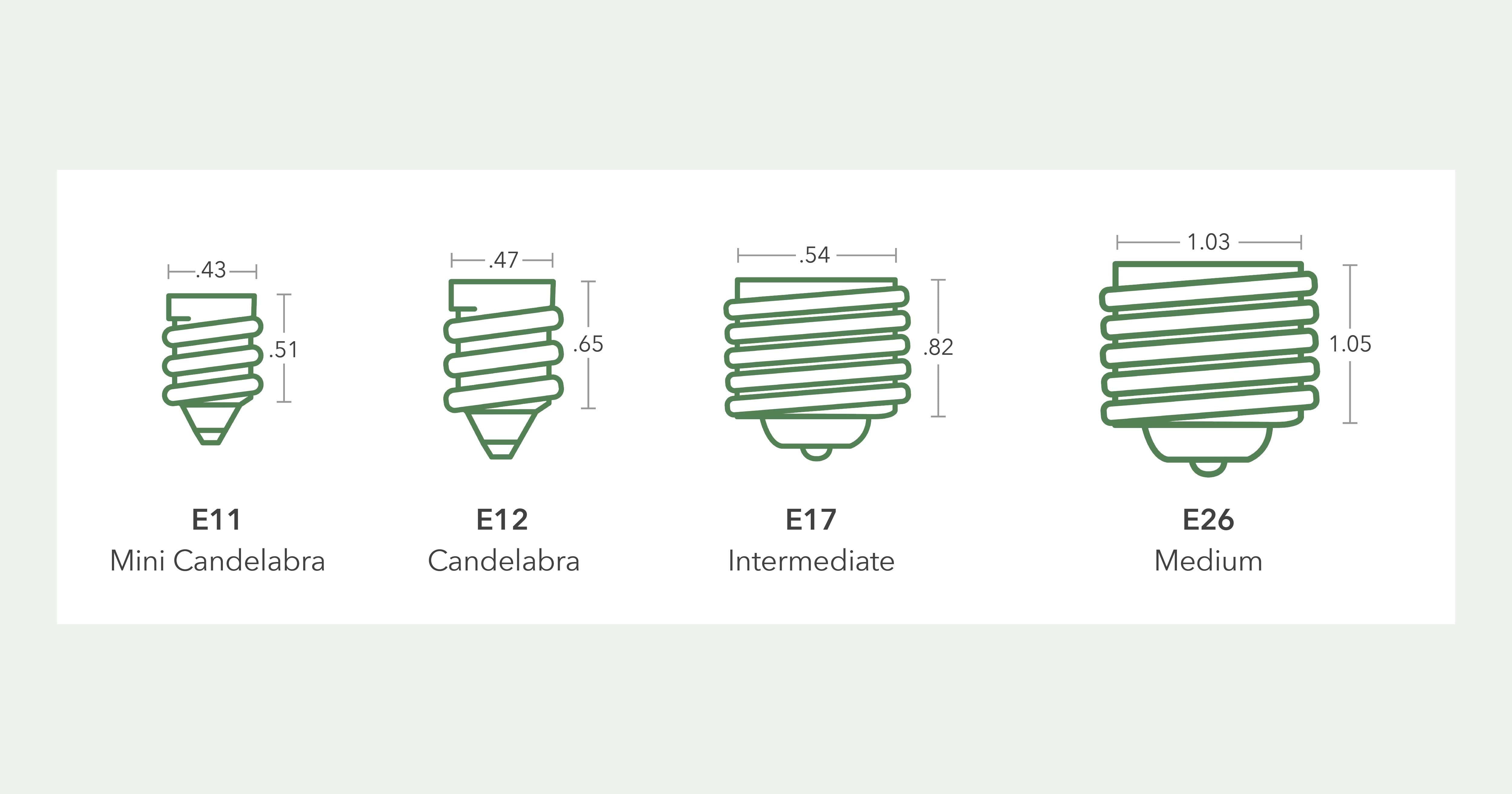
Check the size of your ceiling fan’s bulb socket. It is usually standard size called E26 or E27. Most smart bulbs fit these sockets. But some ceiling fans use smaller or special bulbs. If your fan uses a small bulb, you need a smart bulb of that size.
If the smart bulb is too big, it may not fit or may hit the fan blades. Always measure before you buy.
2. Type Of Smart Bulb
There are many types of smart bulbs. Some are LED bulbs, others are color changing. Some smart bulbs need a hub device, and some do not.
Make sure the smart bulb matches your needs. For ceiling fans, LED smart bulbs are good. They use less energy and last longer.
3. Dimmer Switch Compatibility
Many ceiling fans have dimmer switches. Dimmers change the light brightness. But not all smart bulbs work well with dimmers. Some may flicker or get damaged.
If your fan has a dimmer, check if the smart bulb is dimmer compatible. Or, you can remove the dimmer and use a regular switch. Then control brightness with your phone or voice.
4. Fan Speed And Vibration
Ceiling fans move and cause vibration. This can affect bulbs. Some bulbs are not strong enough for fan use. Make sure the smart bulb is sturdy. Look for bulbs that say they work in ceiling fans.
5. Power Supply
Smart bulbs need power. Ceiling fans usually give power to the light socket. But if your fan uses a special wiring system, the bulb may not get power all the time. Check if the light socket has power when the fan is off.
Benefits of Using Smart Bulbs in Ceiling Fans
Using smart bulbs in ceiling fans can be helpful. Here are some benefits:
- Remote control: Turn lights on and off from anywhere.
- Voice control: Use your voice with smart assistants.
- Adjust brightness: Change how bright the light is easily.
- Change colors: Set different colors for mood lighting.
- Energy saving: Smart bulbs use less power than old bulbs.
- Timers and schedules: Set lights to turn on or off automatically.
Important Tips Before Buying
Before buying a smart bulb for your ceiling fan, remember these tips:
| Tip | Why It Matters |
|---|---|
| Check bulb size | Make sure the bulb fits in the fan’s socket. |
| Check dimmer compatibility | Prevents flickering and damage. |
| Choose LED bulbs | They last longer and save energy. |
| Check power supply | Ensure the light socket gets power. |
| Check vibration resistance | Bulbs should handle fan movement. |
| Read product reviews | See if others used smart bulbs with ceiling fans. |
How to Install Smart Bulbs in Ceiling Fans
Installing smart bulbs in ceiling fans is easy. Follow these steps:
- Turn off the fan and light switch for safety.
- Remove the old bulb from the fan’s light fixture.
- Check the socket size and type.
- Insert the smart bulb gently into the socket.
- Turn the power back on.
- Download the smart bulb app on your phone.
- Follow the app instructions to connect the bulb.
- Test the bulb by turning it on and off with the app.
- Set up voice control if you want to use it.
Common Problems and Solutions
Sometimes, people face problems when using smart bulbs in ceiling fans. Here are some common issues and fixes.
Bulb Flickers Or Blinks
This can happen if the bulb is not dimmer compatible. Try removing the dimmer switch or buy a dimmer-compatible smart bulb.
Bulb Does Not Turn On
Check if the bulb is screwed in tightly. Make sure the power is on. Also, check the app connection.
Bulb Does Not Connect To Wi-fi
Try resetting the bulb. Move closer to the Wi-Fi router. Check your Wi-Fi password.
Bulb Gets Too Hot
Make sure the bulb is not covered by the fan’s light cover. Use LED bulbs as they produce less heat.
Frequently Asked Questions
Can Smart Bulbs Fit In All Ceiling Fan Light Kits?
Not all smart bulbs fit every ceiling fan light kit. Check the bulb size and base type before buying.
Do Smart Bulbs Work With Fan Remote Controls?
Some smart bulbs can work with fan remotes, but not all. Compatibility depends on the remote and bulb type.
Will Smart Bulbs Affect Ceiling Fan Speed Or Function?
Smart bulbs do not impact fan speed or operation. They only control the light’s brightness and color.
Can I Control Smart Bulbs On Fans With My Phone?
Yes, most smart bulbs allow phone control through apps. This lets you adjust brightness and color easily.
Conclusion
Smart bulbs can be used in ceiling fans. But you must check some things first. The bulb size, dimmer compatibility, and power supply are important. Also, choose LED bulbs that can handle fan vibration.
When you use smart bulbs, you get more control over your lighting. You can change colors, brightness, and set schedules. This makes your home more comfortable and fun.
Remember to follow installation steps carefully. And check for problems if they come. With the right smart bulb, your ceiling fan light can become smarter and easier to use.