Many people do not think about their monitor stand height. But it is very important. The right height can help your neck and eyes. It can stop pain and tiredness. This guide will explain how tall your monitor stand should be. You will learn how to find the best height for your desk and body.
Why Does Monitor Stand Height Matter?
Your monitor stand height changes how you sit and see your screen. If it is too low, you may look down all the time. This can hurt your neck and shoulders. If it is too high, you might look up too much. This can cause headaches and eye strain.
When your monitor is at the right height, you sit straight and comfortable. Your eyes look straight ahead, not up or down. This helps you work longer without pain or tiredness.
What Is The Best Height For A Monitor Stand?
The best height is different for each person. It depends on your body and desk. But there are some easy rules to follow.
1. Eye Level Rule
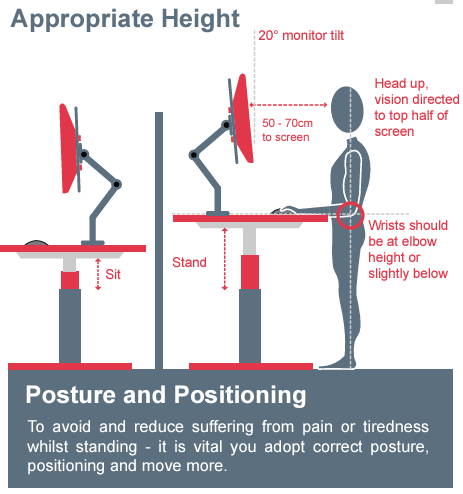
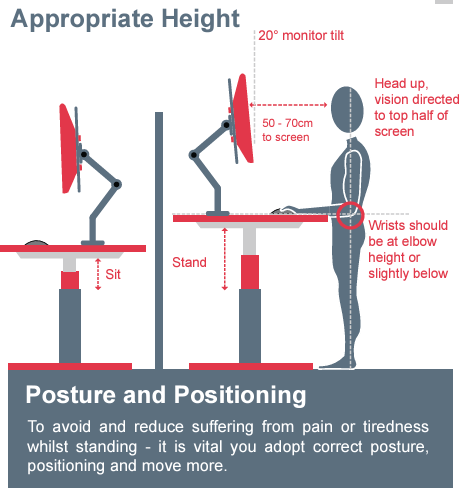
The top of your screen should be at or just below your eye level. This means you look slightly down at the screen. Your eyes should look about 15 degrees down when you sit straight.
Looking down helps your eyes stay moist and less tired. It also helps keep your neck relaxed.
2. Distance From Your Eyes
Your monitor should be about an arm’s length away. This is usually 20 to 30 inches (50 to 75 cm). If it is too close, your eyes get tired. Too far, and you may lean forward or squint.
3. Screen Tilt
Your screen should tilt slightly back, about 10 to 20 degrees. This angle helps reduce glare from lights. It also makes the screen easier to see.
How To Measure Your Ideal Monitor Stand Height
Follow these steps to find the best height for your monitor stand.
- Sit comfortably in your normal working position.
- Look straight ahead and note your eye level.
- Measure the distance from your desk to your eyes.
- Adjust the monitor so the top is at or just below eye level.
- Check the distance is about an arm’s length.
- Tilt the screen back slightly.
Common Monitor Stand Heights
Most monitor stands are adjustable. But if you want to buy a fixed stand, here are some common heights.
| Monitor Size | Stand Height Range | Best For |
|---|---|---|
| Small (19-22 inch) | 4 to 6 inches (10-15 cm) | People with small desks or lower sitting position |
| Medium (23-27 inch) | 6 to 8 inches (15-20 cm) | Most average desk and chair heights |
| Large (28 inch+) | 8 to 12 inches (20-30 cm) | Taller people or larger desks |
How To Adjust Your Monitor Stand Height
If your monitor stand is not the right height, you can fix it.
- Use an adjustable stand. Many stands allow height changes.
- Stack books or boxes. Place them under your stand to raise it.
- Buy a new stand. Choose one with the right height for you.
- Use a monitor arm. These attach to your desk and move easily.
How Monitor Height Affects Your Health
Having the wrong monitor height can cause many problems. You may feel neck pain, back pain, or headaches. Your eyes may become dry or blurry. This happens because you look in an uncomfortable way.
Good monitor height helps you avoid these problems. You sit better. You feel less tired. You work more comfortably and safely.
Tips For Better Monitor Setup
- Keep your feet flat on the floor or a footrest.
- Sit back in your chair with your back supported.
- Keep your keyboard and mouse close and at a good height.
- Take breaks every 30 minutes to rest your eyes and stretch.
- Use good lighting to avoid screen glare and eye strain.
Why You Should Not Ignore Monitor Stand Height
Many people think monitor stand height does not matter. But it does. Sitting with a bad screen height can cause long-term health issues. You might get pain that lasts for years. You could become less productive at work or school.
Spending a little time to fix your monitor height is worth it. Your body will thank you. Your work will get easier. You will feel better every day.
Summary: How Tall Should Your Monitor Stand Be?
Here is what you should remember:
- The top of your monitor should be at or just below eye level.
- Your eyes should look slightly down at the screen.
- The monitor should be one arm’s length away.
- The screen should tilt back a little to reduce glare.
- Adjust your stand height to fit these rules.
Use these tips to find the best height for your monitor stand. Your neck, eyes, and back will feel better. You will work or study more comfortably. Good monitor height is simple but very important.
Frequently Asked Questions
How Tall Should A Monitor Stand Be For Ergonomic Comfort?
A monitor stand should raise the screen so the top is at eye level. This helps keep your neck straight and reduces strain.
What Is The Ideal Height For A Monitor Stand?
The ideal height places the monitor’s top edge at or slightly below your eye line. This setup supports good posture and comfort.
Can A Monitor Stand Affect Neck And Back Pain?
Yes, a proper stand height prevents bending your neck downward or upward. This reduces neck and back pain over long use.
How To Measure The Right Height For A Monitor Stand?
Sit straight and measure from your eye level to your desk. The stand height should match this to keep the screen at eye level.