Using a Plantronics headset with your desk phone is easy. A headset helps you talk and listen without holding the phone. This keeps your hands free. You can do other work while talking. Here, you will learn how to connect and use your Plantronics headset with a desk phone step by step.
What You Need To Know Before You Start
First, check your phone and headset. Not all headsets and phones work the same way. Plantronics makes many types of headsets. Some are wired, some are wireless. Desk phones also vary. Some have special ports for headsets. Others use adapters.
Look at your desk phone. Does it have a headset port? It usually looks like a small round hole or a special plug. If your phone does not have this port, you may need an adapter.
Parts You Will Need
- Plantronics headset: Choose wired or wireless.
- Desk phone: Check for headset port.
- Headset cable or adapter: Sometimes included with your headset.
- Phone cord: To connect phone to base or wall.
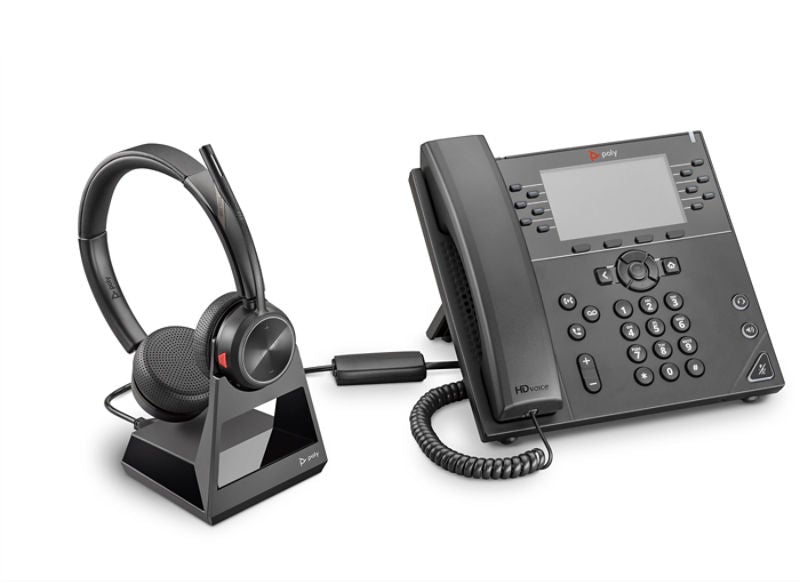
Step 1: Check Your Desk Phone and Headset
Look at the back or side of your desk phone. Find the headset port. It is usually labeled “headset” or has a small headphone icon.
Check your Plantronics headset. If it is wired, it should have a plug. This plug might be a 3.5 mm jack or a special connector. Wireless headsets usually have a base station with cables.
Step 2: Connect the Headset to the Desk Phone
If your phone has a headset port:
- Plug the headset cable into the phone’s headset port.
- Plug the other end into your headset or base station.
If your phone does NOT have a headset port, you need an adapter:
- Unplug the phone cord from the phone base.
- Plug the phone cord into the adapter.
- Connect the adapter to the phone base.
- Plug the headset cable into the adapter.
The adapter lets the headset work with your phone. It sends sound back and forth.
Step 3: Turn On Your Headset
If your Plantronics headset is wireless, press the power button. Wait for it to connect to the base station. Usually, you see a light or hear a beep. This means it is ready.
If your headset is wired, no power is needed. Just plug it in, and it works.
Step 4: Adjust the Volume
Use the volume controls on the headset or base station. Make sure you hear the other person clearly. Also, check the microphone volume. Speak and listen to check sound quality.
Do not make the volume too loud. It can hurt your ears.
Step 5: Test Your Headset
Make a test call. Use your desk phone to call a friend or coworker. Talk and listen using the headset. Make sure the sound is clear. Check if the microphone picks up your voice well.
If you have trouble hearing, adjust the volume again. If the other person cannot hear you, check the microphone placement. Move it closer to your mouth, about one inch away.

Extra Tips To Use Your Plantronics Headset
- Keep your headset clean: Wipe the ear cushions and microphone with a soft cloth.
- Charge wireless headset: Always charge before use. Low battery lowers sound quality.
- Use the mute button: If you want to stop sound temporarily, press mute.
- Wear the headset properly: Make sure the ear cushion fits your ear. Place the microphone near your mouth.
- Use the call control button: Some headsets let you answer or end calls with a button.
Common Problems and How To Fix Them
| Problem | Possible Cause | Solution |
|---|---|---|
| No sound in headset | Wrong connection or volume too low | Check plugs, adjust volume |
| Microphone not working | Mic not close enough or muted | Move mic closer, check mute button |
| Static or noise | Bad cable or interference | Try new cable, move away from devices |
| Wireless headset not connecting | Low battery or out of range | Charge headset, move closer to base |
Why Use a Plantronics Headset With Your Desk Phone?
Using a headset with your desk phone has many benefits:
- Hands-free calls: You can type or write while talking.
- Comfort: No need to hold the phone for long time.
- Better sound: Headsets reduce background noise.
- Easy to move: Wireless headsets let you walk around.
- More professional: Clear calls improve work communication.
Final Thoughts
Using a Plantronics headset with your desk phone is simple. First, check your phone and headset. Then, connect the headset correctly. Turn it on and adjust the volume. Test the headset by making a call. Follow tips to keep it working well.
Headsets help you work better and stay comfortable. They make phone calls easier and clearer. Now you can enjoy your Plantronics headset with your desk phone every day.
Frequently Asked Questions
How Do I Connect A Plantronics Headset To A Desk Phone?
Connect the headset to the phone’s headset port or use the phone’s adapter. Ensure cables are secure. Turn on the headset if it’s wireless.
Can I Use Any Plantronics Headset With My Desk Phone?
Not all Plantronics headsets fit every desk phone. Check compatibility before buying. Look for models made for desk phones.
What Is The Best Way To Charge A Wireless Plantronics Headset?
Use the charging base or USB charger that comes with the headset. Charge fully before use. Avoid overcharging to extend battery life.
How Do I Adjust The Volume On My Plantronics Headset?
Use the volume buttons on the headset or the desk phone. Some models have easy-to-reach controls. Adjust during a call for comfort.